
within its OneDrive online file storage service that will allow you
to keep your sensitive and important files protected and secured
with an extra layer of authentication.
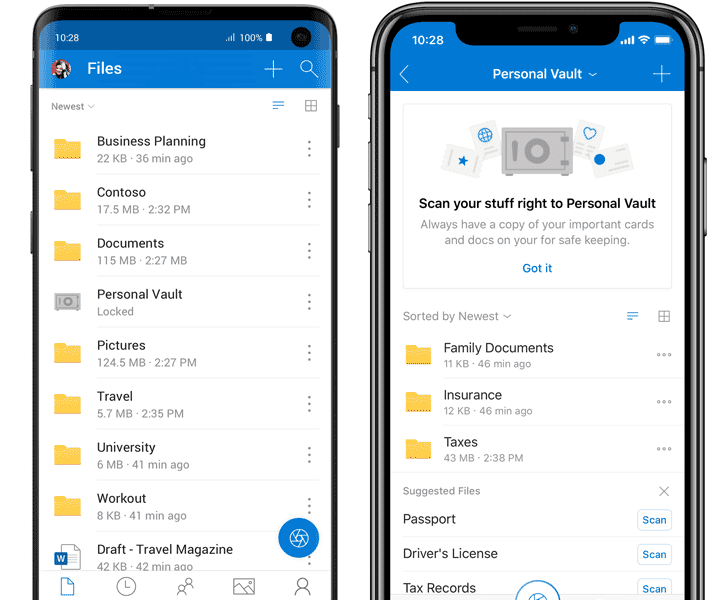
Dubbed Personal Vault, the new OneDrive folder can only
be accessed with an additional step of identity verification, such
as your fingerprint, face, PIN, or a two-factor authentication code
sent to you via email or SMS.
The Personal Vault folder will appear next to other folders in
the OneDrive app like your Documents and Pictures, but it will be
locked and prompt you for an additional code each time you try to
access them via the web, PC, or mobile devices, thus keeping them
more secure in the event when someone gains access to your account
or your device.
Microsoft suggests this
new protected area in OneDrive would be useful for users to store
more sensitive and personal files like copies of passport, tax, car
or home documents, identification cards, and financial information,
for instance.
To instantly store your files in the Personal Vault folder, all
you need to do is scan in your documents directly into your
Personal Vault through the OneDrive app. You can even take pictures
and shoot videos with OneDrive and send them straight to Personal
Vault.
You can store as many files you want in the Personal Vault
folder, up to your overall OneDrive storage limit. Microsoft is
also increasing OneDrive’s base storage plan from 50GB to 100GB at
no additional cost.
OneDrive currently offers, including file encryption “at rest” in
Microsoft’s cloud and in transit to a device, ransomware
protection, mass file deletion and recovery, suspicious activity
monitoring, virus scanning on download for known threats, and
version history for all file types.
In addition, when the OneDrive app syncs your Personal Vault
files to your computer, it directly stores those files to a
BitLocker-encrypted area of your local hard drive on your Windows
10 computer, instead of any regular folder.
“For further protection on mobile devices, we recommend that you
enable encryption on your iOS or Android device,” Microsoft says.
“Together, these measures help keep your files protected even if
your Windows 10 PC or mobile device is lost, stolen, or someone
gains access to it.”
devices and 20 minutes on the web or local hard drive by default),
the Personal Vault will automatically relock, and you’ll have to
reauthenticate to gain access again.
Moreover, if you try to access OneDrive remotely through a web
browser on an unfamiliar PC, the browser will not save your files
within the Personal Vault in its cache.
Microsoft is making the OneDrive Personal Vault feature
available to the web version of its OneDrive, Windows 10 PCs, as
well as the iOS and Android mobile apps.
OneDrive Personal Vault is currently only rolling out in
Australia, New Zealand, and Canada, though the company will make it
available to all markets by the end of the year.
Read more http://feedproxy.google.com/~r/TheHackersNews/~3/crD-nt1k7Uc/microsoft-onedrive-personal-vault.html