and that’s because it knows a lot about you, me, and everyone.
Facebook uses many tools to track people across the Internet,
whether they have an account with the social networking site or
not, and most of them rely on the online activity data other apps
and websites share with Facebook.
Everything we do online generates an extensive amount of
behavioral data, from buying clothes to looking for hotels, which
apps and websites often share with advertising companies, allowing
them to build more accurate profiles of your interests and
needs.
However, after facing worldwide criticism over privacy and data
breach controversies, Facebook last summer announced a privacy
tool, called Off-Facebook
Activity, which gives users more control of their data
collected by Facebook.
[1]
Starting today on Data Privacy Day 2020, the Off-Facebook
Activity feature is now available to every user around the world,
which was initially made only available to users in Ireland, South
Korea, and Spain for testing.
Initially introduced as “Clear History,” the tool offers users a
clear summary of what information Facebook holds on you based on
other apps you used or websites you’ve visited and also lets you
delete it from your account if you want to.
sites, and we use that information to show you ads that are
relevant to you. Now you can see a summary of that information and
clear it from your account if you want to.”
How to Use Off-Facebook Activity Tool?
However, it’s important to note that the feature doesn’t actually
allow users to delete their browsing information from Facebook
servers; instead, it simply lets users dissociate collected data
from their Facebook account.
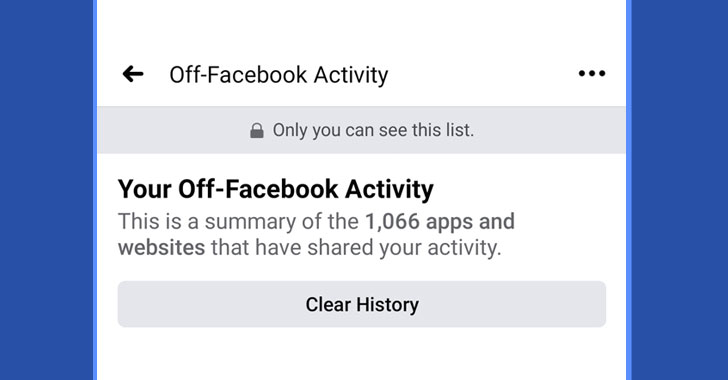
For example, I tried it and found that over 1000 apps and websites
had shared my online activity with Facebook in the past 180 days,
many of which are news, banking, and healthcare organizations, and
even LinkedIn.
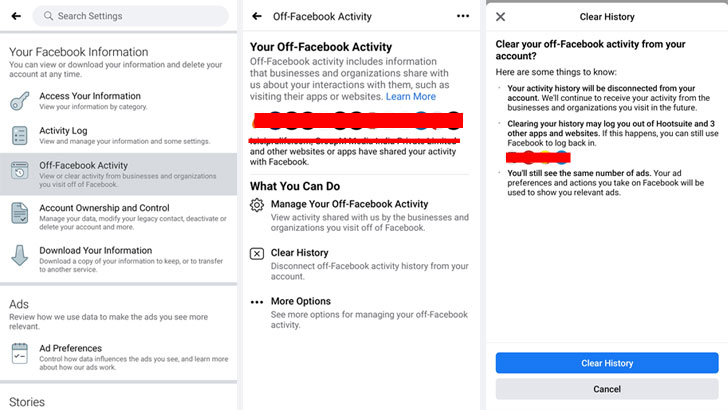
To access Off-Facebook Activity tool:
- Go to ‘Settings & Privacy’ in your Facebook app,
- Select ‘Off-Facebook Activity,’
- On the next screen, you are provided with a list of all the
websites and apps that had shared your data with Facebook. - You can choose specific apps to see how many interactions you
had with them. - You can download activity details by clicking on the number of
interactions and clicking Download Activity Details at the bottom
of the popup. - If you’re very concerned about the data that Facebook holds on
you, it’s worth clearing your history by clicking on the ‘Clear
History.’
It should also be noted that after using the “clear history”
option, you will be logged out of certain websites you have
accessed using your Facebook account.
Besides this, clearing history doesn’t stop third-parties from
future data-sharing, and there’s another option, called ‘Manage
Future Activity,’ which also doesn’t restrict Facebook from
receiving your activity data from the businesses in the future.
It’s just, the new information won’t be associated with your
account.
Still, it’s a remarkable step forward towards transparency and
control, as Facebook rivals such as Google don’t offer anything
comparable to the “Off-Facebook Activity” page.
References
- ^
Off-Facebook Activity
(thehackernews.com)
Read more http://feedproxy.google.com/~r/TheHackersNews/~3/uhHFO9BhU1c/off-facebook-activity-data.html