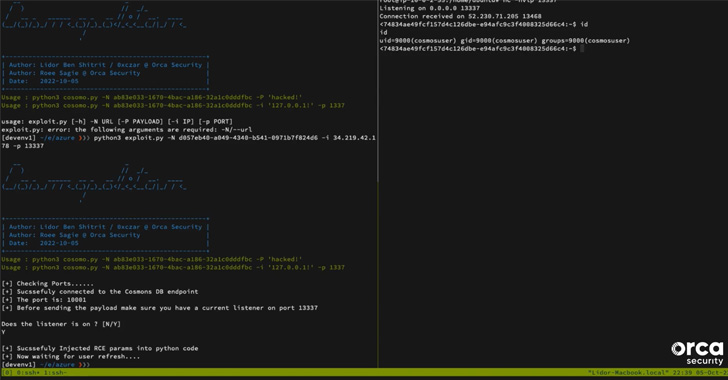
Microsoft on Tuesday said it addressed an authentication bypass
vulnerability in Jupyter Notebooks[1]
for Azure Cosmos DB that enabled full read and write access.
The tech giant said the problem was introduced on August 12,
2022, and rectified worldwide on October 6, 2022, two days after
responsible disclosure from Orca Security, which dubbed the flaw
CosMiss[2].
“In short, if an attacker had knowledge of a Notebook’s
‘forwardingId,’ which is the UUID of the Notebook Workspace, they
would have had full permissions on the Notebook without having to
authenticate, including read and write access, and the ability to
modify the file system of the container running the notebook,”
researchers Lidor Ben Shitrit and Roee Sagi said.
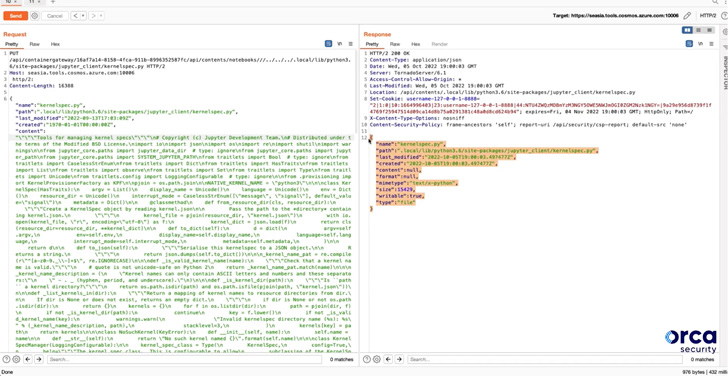
This container modification could ultimately pave the way for
obtaining remote code execution in the Notebook container by
overwriting a Python file associated with the Cosmos DB Explorer[3]
to spawn a reverse shell.
Successful exploitation of the flaw, however, requires that the
adversary is in possession of the unique 128-bit forwardingId and
that it’s put to use within a one-hour window, after which the
temporary Notebook is automatically deleted.
“The vulnerability, even with knowledge of the forwardingId, did
not give the ability to execute notebooks, automatically save
notebooks in the victim’s (optional) connected GitHub repository,
or access to data in the Azure Cosmos DB account,” Redmond said[4].
Microsoft noted in its own advisory that it identified no
evidence of malicious activity, adding no action is required from
customers. It also described the issue as “difficult to exploit”
owing to the randomness of the 128 bit forwadingID and its limited
lifespan.
“Customers not using Jupyter Notebooks (99.8% of Azure Cosmos DB
customers do NOT use Jupyter notebooks) were not susceptible to
this vulnerability,” it further said.
References
- ^
Jupyter
Notebooks (learn.microsoft.com) - ^
CosMiss
(orca.security) - ^
Cosmos
DB Explorer (learn.microsoft.com) - ^
said
(msrc-blog.microsoft.com)
Read more https://thehackernews.com/2022/11/researchers-disclose-details-of.html