
from home, a slew of
digital threats[1] have capitalized on
the health concern to exploit weaknesses in the remote work
infrastructure and carry out malicious attacks.
Now according to network security platform provider SAM
Seamless Network[2], over 200,000 businesses
that have deployed the Fortigate VPN solution to enable employees
to connect remotely are vulnerable to man-in-the-middle (MitM)
attacks that could allow an attacker to present a valid SSL
certificate and fraudulently take over a connection.
“We quickly found that under default configuration the SSL VPN
is not as protected as it should be, and is vulnerable to MITM
attacks quite easily,” SAM IoT Security Lab’s Niv Hertz and Lior
Tashimov said.
“The Fortigate SSL-VPN client only verifies that the CA was
issued by Fortigate (or another trusted CA), therefore an attacker
can easily present a certificate issued to a different Fortigate
router without raising any flags, and implement a man-in-the-middle
attack.”
To achieve this, the researchers set up a compromised IoT device
that’s used to trigger a MitM attack soon after the Fortinet VPN
client initiates a connection, which then steals the credentials
before passing it to the server and spoofs the authentication
process.
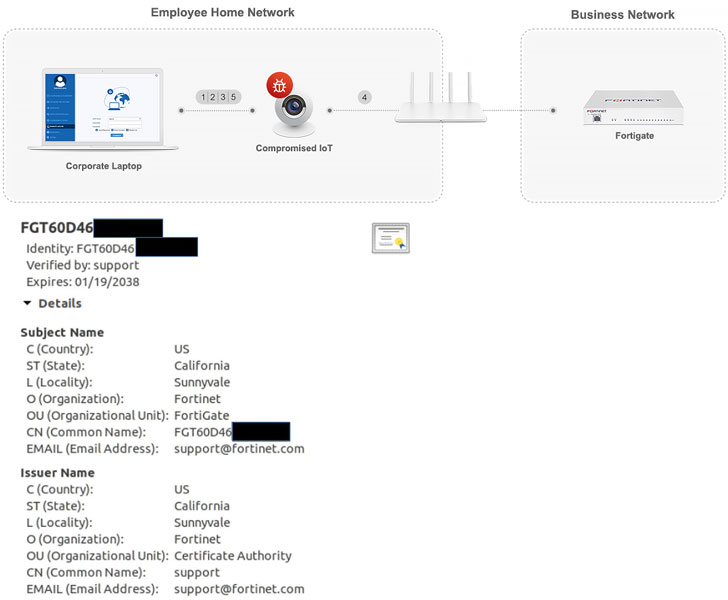
SSL certificate validation, which helps vouch for the
authenticity of a website or a domain, typically works by verifying
its validity period, digital signature, if it was issued by a
certificate authority (CA) that it can trust, and if the subject in
the certificate matches with the server the client is connecting
to.
The problem, according to the researchers, lies in the use of
default self-signed SSL
certificates[3] by
companies.
Given that every Fortigate router comes with a default SSL
certificate that is signed by Fortinet, that very certificate can
be spoofed by a third-party as long as it’s valid and issued either
by Fortinet or any other trusted CA, thus allowing the attacker to
re-route traffic to a server their control and decrypt the
contents.
The main reason for this is that the bundled default SSL
certificate uses the router’s serial number as the server name for
the certificate. While Fortinet can use the router’s serial number
to check if the server names match, the client appears to not
verify the server name at all, resulting in fraudulent
authentication.
In one scenario, the researchers exploited this quirk to decrypt
the traffic of the Fortinet SSL-VPN client and extract the user’s
password and OTP.
“An attacker can actually use this to inject his own traffic,
and essentially communicate with any internal device in the
business, including point of sales, sensitive data centers, etc,”
the firm said. “This is a major security breach that can lead to
severe data exposure.”
For its part, Fortinet said it has no plans to address the
issue, suggesting that users can manually replace the default
certificate and ensure the connections are safe from MitM
attacks.
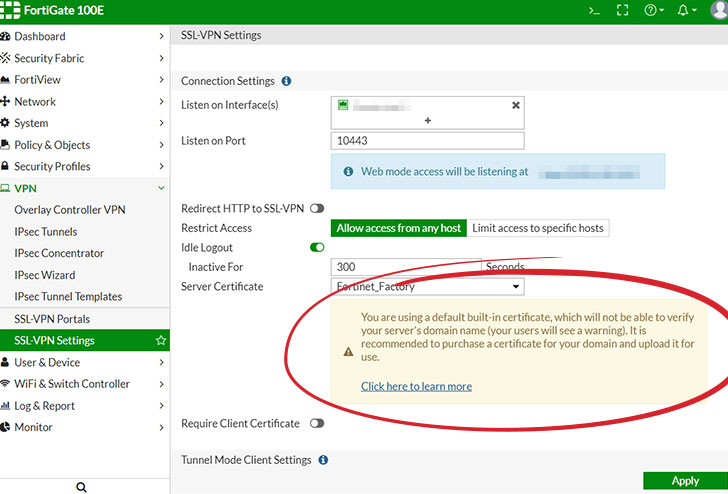
Currently, Fortinet provides a warning when using the default
certificate: “You are using a default built-in certificate, which
will not be able to verify your server’s domain name (your users
will see a warning). It is recommended to purchase a certificate
for your domain and upload it for use.”
“The Fortigate issue is only an example of the current issues
with security for the small-medium businesses, especially during
the epidemic work-from-home routine,” Hertz and Tashimov noted.
“These types of businesses require near enterprise grade
security these days, but do not have the resources and expertise to
maintain enterprise security systems. Smaller businesses require
leaner, seamless, easy-to-use security products that may be less
flexible, but provide much better basic security.”
References
- ^
slew of digital threats
(thehackernews.com) - ^
SAM Seamless Network
(securingsam.com) - ^
self-signed SSL certificates
(en.wikipedia.org)
Read more http://feedproxy.google.com/~r/TheHackersNews/~3/olEmYxK4s00/fortigate-vpn-security.html