Protection” feature on its Firefox browser by default, which from
now onwards would automatically block all third-party tracking
cookies that allow advertisers and websites to track you across the
web.
Tracking cookies, also known as third-party cookies, allows
advertisers to monitor your online behavior and interests, using
which they display relevant advertisements, content, and promotions
on the websites you visit.
Which makes sense as no one likes to waste time in watching
advertisements and offers that are not of one’s interest.
However, since tracking cookies gather way more information
without requiring users’ explicit permissions and there is no
control over how companies would use it, the technique also poses a
massive threat to users’ online privacy.
To limit this extensive tracking, Mozilla included the “Enhanced
Tracking Protection” option as an experimental feature in October
last year with the release of Firefox 63 to block known
“third-party tracking cookies” compiled by an open-source
anti-tracking tool called Disconnect.
To address the same issue, Google also recently introduced an
improved version of SameSite Cookies
and fingerprinting protection[1], allowing Chrome browser
users to quickly identify third-party tracking cookies and delete
them without disrupting their web-login cookies.
Firefox Now Blocks Third-Party Tracking Cookies By Default
From now onwards, the “Enhanced Tracking Protection” setting will
come enabled by default for new users who download and install a
fresh copy of Firefox, while existing users can either enable the
feature manually or wait for Mozilla to activate the feature for
all users in the coming months.
“Enhanced Tracking Protection will be practically invisible to
you, and you’ll only notice that it’s operating when you visit a
site and see a shield icon in the address bar next to the URL
address and the small ‘i’ icon,” Dave Camp, senior VP of Firefox,
writes in a blog
post[2].
“When you see the shield icon, you should feel safe that Firefox
is blocking thousands of companies from your online
activity.”
In total, the Enhanced Tracking Protection feature will block known
third-party cookies from more than 2,500 tracking domains, though
Mozilla has plans to grow that list over time.
Existing Firefox Users Have to Enable It Manually
If you are currently using Firefox, I would recommend you to enable
Enhanced Tracking Protection manually, instead of waiting for the
company to do that for you.
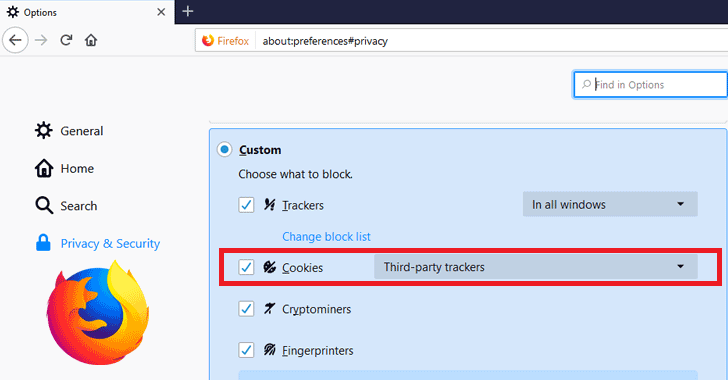
In order to turn the Enhanced Tracking Protection feature on,
just follow the given below steps:
- Click on the menu icon of your Firefox web browser
- Select “Content Blocking”
- Go to your “Privacy & Security” settings
- Select the “Custom” gear
- Now select “third-party trackers” under “Cookies”
Mozilla is not the only browser maker that is taking more
aggressive measures to prevent tracking by ad companies.
Google recently also announced its plans to offer a new mechanism
in its Chrome browser that will enable users to block third-party
cookies[3], while keeping some
amount of web tracking alive.
However, since Google survives off of targeted ads, Chrome is
likely to continue lagging behind Mozilla Firefox and Apple
Safari.
More Updates: Firefox Lockwise and Facebook Container
Besides Enhanced Tracking Protection, Firefox also rolled out a
free, desktop version of its mobile Lockbox password manager, which
will be called Firefox Lockwise, making it easier for
desktop users to manage their website logins.
Moreover, Mozilla’s update also includes an upgrade to its
Facebook Container extension for Firefox—which has nearly 2
million downloads—that will prevent embedded Facebook capabilities
such as the ‘Share’ and ‘Like’ buttons on third-party sites from
tracking users.
For those unaware, embedded Facebook Like and Share buttons on
any website allow the social media giant to build shadow profiles
of non-Facebook users.
However, installing Facebook Container on Firefox blocks these
buttons and all connections to Facebook’s servers, making the
company unable to track your visits to these sites.
References
- ^
SameSite Cookies and fingerprinting
protection (thehackernews.com) - ^
blog post
(blog.mozilla.org) - ^
block third-party cookies
(thehackernews.com)
Read more http://feedproxy.google.com/~r/TheHackersNews/~3/vGzPUxAZeoA/firefox-tracking-cookies.html