Organizations struggle to find ways to keep a good security
posture. This is because it is difficult to create secure system
policies and find the right tools that help achieve a good posture.
In many cases, organizations work with tools that do not integrate
with each other and are expensive to purchase and maintain.
Security posture management is a term used to describe the
process of identifying and mitigating security misconfigurations
and compliance risks in an organization. To maintain a good
security posture, organizations should at least do the
following:
- Maintain inventory: Asset inventory is
considered first because it provides a comprehensive list of all IT
assets that should be protected. This includes the hardware
devices, applications, and services that are being used. - Perform vulnerability assessment: The next
step is to perform a vulnerability assessment to identify
weaknesses in applications and services. Knowledge of the
vulnerabilities help to prioritize risks. - Ensure secure system configuration: This
involves modifying system settings in order to increase overall
system security by mitigating risks. Actions such as changing
default settings, identifying and eliminating misconfigurations
tend to improve organizational security posture. - Monitor all assets to detect attacks:
Additionally, all IT assets should be continuously monitored to
detect attacks against the infrastructure. This can be done by
monitoring network, system, and application logs for anomalies or
indicators of compromise.
The Wazuh solution
Wazuh[1] is an open source
unified XDR and SIEM platform. It is free to use and has over 10
million annual downloads. The Wazuh platform has agents which are
deployed on the endpoints you want to monitor. The Wazuh agent
collects security event data from the monitored endpoints and
forwards them to the Wazuh server for log analysis, correlation,
and alerting.
The Wazuh platform has several inbuilt modules with the aim of
improving the overall security posture of an organization. We have
highlighted some relevant Wazuh modules in the following
sections.
System inventory
The Wazuh system inventory module gathers information from
monitored endpoints where the Wazuh agent is installed. This module
collects the following classes of information from the
endpoints:
- Hardware and operating system information.
- Installed applications and packages.
- Network interfaces and open ports.
- Available updates and running processes.
Examples of the inventory data collected by Wazuh are shown in
the image below:
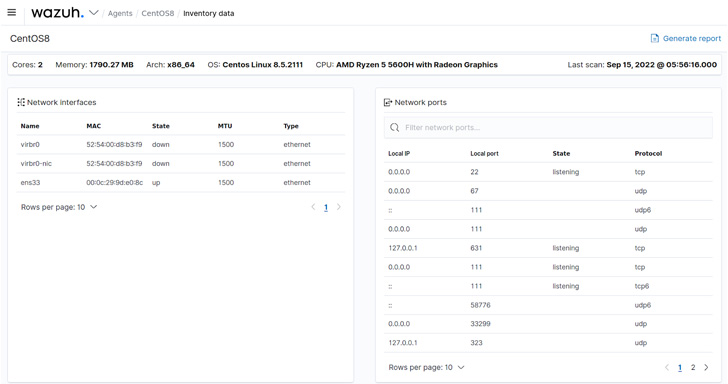
Information obtained here is later used for vulnerability or
threat detection. For example, the version of an installed package
can be used to determine whether it is vulnerable or not.
Vulnerability detector
The Wazuh vulnerability detector module is used to discover
vulnerabilities that may be present in the operating system and
applications on the monitored endpoints. The Wazuh server builds a
global vulnerability database from publicly available CVE
repositories. This information is cross-correlated with the
endpoint inventory data to detect vulnerabilities. An example
result of a Wazuh vulnerability scan is shown below:
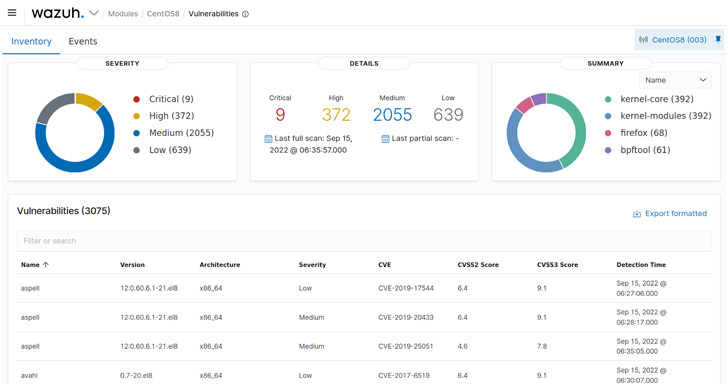
Detected vulnerabilities are classified into four severity
levels namely: critical, high, medium, and low. This helps when
prioritizing risks and exposures.
Security configuration assessment (SCA)
The Wazuh SCA module can assess system configuration and raise
alerts when configurations fail to meet defined secure system
policies. Wazuh has out-of-the-box SCA policies that are used to
check for compliance with the Center of Internet Security (CIS)
benchmarks. Users can easily write their own policies or extend
existing ones to fit their needs. Wazuh SCA policies are written in
YAML format which is readable and easy to understand.
Examples of the events generated when the SCA module is executed
on an endpoint are shown below:
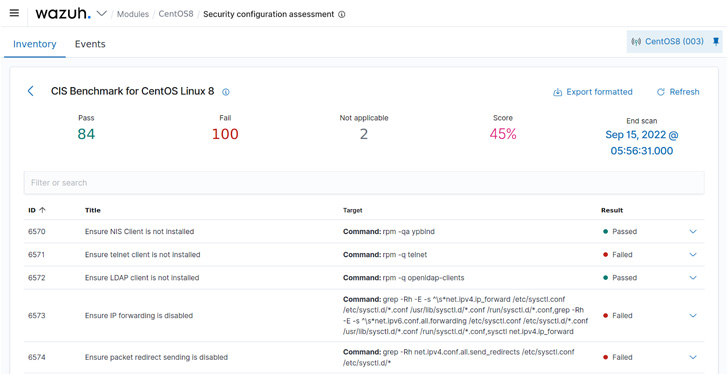
Each SCA check on the Wazuh dashboard contains information about
the configuration that was checked and the remediation steps to
harden the system. We expand one of the SCA checks and get the
following detailed result:
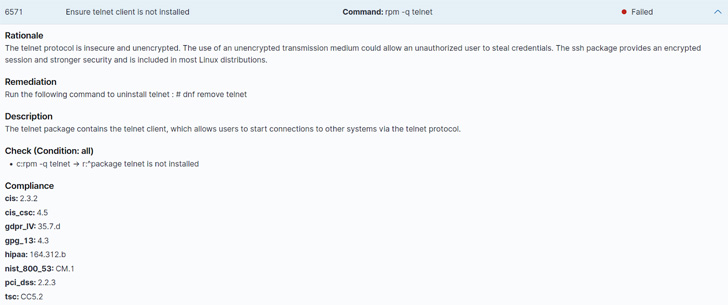
With the SCA module, we are able to check for misconfigurations
and compliance with various regulatory frameworks (PCI DSS, GDPR,
and NIST). The compliance checks done by the Wazuh SCA module are
crucial for organizations in heavily regulated industries.
Threat detection and response
The Wazuh agent forwards security event data to the Wazuh server
for malware and anomaly detection. In addition to this, the agent
runs periodic scans on monitored endpoints to detect rootkits.
Wazuh monitoring capabilities are not limited to the Wazuh
agents alone. The Wazuh platform provides agentless monitoring for
devices such as routers, firewalls, and switches that do not
support the installation of agents.
As a unified XDR and SIEM platform, security event data from
various security products are forwarded to Wazuh for correlation
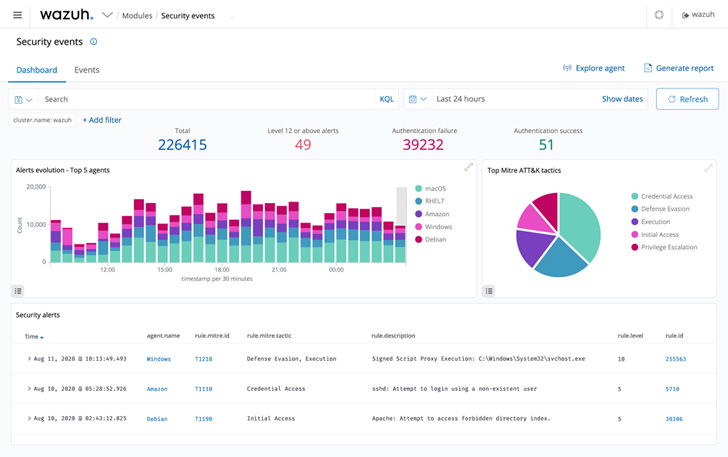
and alert generation. A sample of the Wazuh security events
dashboard is shown below:
It is necessary to take remediation actions when security
incidents are detected. Wazuh has the ability to automate
remediation actions with its active response module. This is useful
in responding to critical or frequent alerts that need automation
to reduce the workload of the analysts. For example, an active
response script can block an IP address attempting bruteforce on
SSH login. Custom active response scripts can be created to execute
when certain alerts are triggered.
The takeaway
A good security posture reduces the attack surface of any
organization. We have highlighted some of the things to consider in
order to achieve a maintain a good posture. We propose a free
solution that integrates well with a wide variety of systems,
technologies, and endpoints. Wazuh is able to maintain inventory,
perform vulnerability assessment, check for secure system
configuration, and detect and respond to attacks.
Wazuh is free to use and has a large community[2] of users who support
each other and help to improve the product. You can utilize the
Quickstart guide[3]
to quickly deploy a Wazuh server, or use the on-demand Wazuh cloud[4] service.
References
- ^
Wazuh
(wazuh.com) - ^
community
(wazuh.com) - ^
Quickstart guide
(documentation.wazuh.com) - ^
Wazuh cloud
(wazuh.com)
Read more https://thehackernews.com/2022/09/improve-your-security-posture-with.html