
Microsoft, over the weekend, rolled out a fix to address an
issue that caused email messages to get stuck on its Exchange
Server platforms due to what it blamed on a date validation error
at around the turn of the year.
“The problem relates to a date check failure with the change of
the new year and it [is] not a failure of the [antivirus] engine
itself,” the company said[1]
in a blog post. “This is not an issue with malware scanning or the
malware engine, and it is not a security-related issue. The version
checking performed against the signature file is causing the
malware engine to crash, resulting in messages being stuck in
transport queues.”
The Windows maker said the issue impacted on-premises versions
of Exchange Server 2016 and Exchange Server 2019 but didn’t specify
how widespread the impact was.
The issue began to gain[2]
attention[3]
as the year 2022 kicked in, causing the servers to no longer
deliver email messages while throwing the following error message:
“The FIP-FS ‘Microsoft’ Scan Engine failed to load. PID: 23092,
Error Code: 0x80004005. Error Description: Can’t convert
‘2201010001’ to long.”
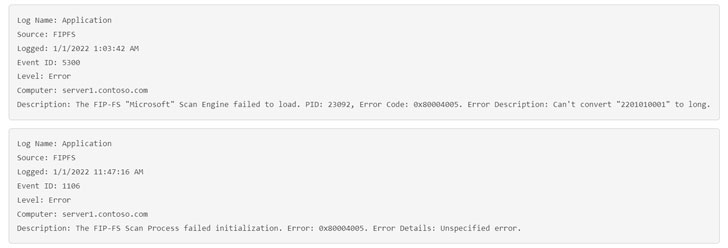
Microsoft noted that the issue was caused due to a date issue in
a signature file used by the malware scanning engine within
Exchange Server.
To mitigate the Y2K22 problem, Microsoft is recommending
customers to download a PowerShell-based scan engine reset script
called “Reset-ScanEngineVersion.ps1[4]” that can then be
executed on each Exchange mailbox server used for downloading
antimalware updates. It’s worth noting that the update will also
change the version of the engine to 2112330001.
“The newly updated scanning engine is fully supported by
Microsoft,” the company outlined. “While we need to work on this
sequence longer term, the scanning engine version was not rolled
back, rather it was rolled forward into this new sequence. The
scanning engine will continue to receive updates in this new
sequence.”
References
Read more https://thehackernews.com/2022/01/microsoft-issues-fix-for-exchange-y2k22.html