Online account creation poses a challenge for engineers and
system architects: if you put up too many barriers, you risk
turning away genuine users. Make it too easy, and you risk fraud or
fake accounts.
The Problem with Identity Verification
The traditional model of online identity – username/email and
password – has long outlived its usefulness. This is how
multi-factor or two-factor authentication (MFA or 2FA) has come
into play, to patch up vulnerabilities of the so-called
knowledge-based model, usually by SMS passcode to verify possession
of a mobile phone number.
The simplicity of SMS-based verification has taken apps by storm
– it’s the default option, as most users have a mobile phone. Yet
bad actors have learned how to exploit this verification method,
leading to the menace of SIM swap fraud[1], which is alarmingly
easy to pull off and rising rapidly in incidents.
There’s been no lack of effort in finding a more secure factor
that is still universal. For example, biometrics are powerful, but
not every user has a smartphone that can take a fingerprint or face
ID. Authenticator apps are a strong alternative, but they’re
complex and not suitable for casual users. Similarly, hardware
tokens are very secure, but only for the very tech-minded: it’s not
realistic for the average consumer to buy and carry one.
Introducing SIM-based Verification
Sometimes the simplest solution is already in our hands. SMS
alone may not be secure, but mobile phone numbers tethered to a SIM
card are: they’re a unique pairing that is difficult to tamper with
or copy.
SIM-based authentication is an identity
breakthrough[2]. It is now possible to
prevent fraud and fake accounts while seamlessly verifying mobile
users using the most cryptographically secure identifier they
already have – the SIM card embedded in their mobile devices.
The Latest Method to Prevent Account Takeovers and SIM Swap
Fraud
If you’re concerned about SIM swap fraud as a threat to your
users, you’d be right. SIM swap fraud is a growing issue with
serious financial consequences – FinTechs and cryptocurrency
wallets have been especially targeted, but any platform that uses
SMS to verify identity is at risk. All it takes is one compromised
user to cause major support issues and brand damage.
SIM-based authentication[3] provides a simple fix,
with an immediate, actionable response. Fraudsters attempt to
access their victims’ accounts usually within 24 hours, so by
checking for SIM swap activity within the last 7 days,
SubscriberCheck by tru.ID can detect them at the gate.
If there has been a change of SIM card, that change will be
flagged, and you can implement step-up security user journeys or
prevent access altogether.
How the SIM-Authentication API Works
The SIM card within the phone is already authenticated with the
Mobile Network Operator (MNO). SIM authentication allows mobile
customers to make and receive phone calls and connect to the
Internet.
SubscriberCheck from tru.ID[4] hooks into the same
authentication mechanism as MNOs. As a result, the tru.ID API does
two things. Firstly, it verifies that the mobile number is active
and paired to the SIM card on the mobile phone. As part of this
verification, the API also retrieves information if the SIM card
associated with the phone number has recently changed. These checks
can be integrated easily with APIs and SDKs.
Powerful and private: Here is How to use SubscriberCheck
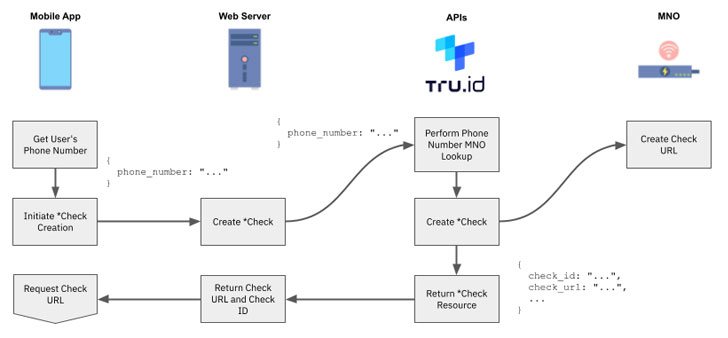
1 — Test the tru.ID API with a phone number
you’d like to verify and check SIM status on.
2 — The tru.ID platform performs a lookup on
the phone number to determine which MNO it is associated with.
3 — tru.ID then asks that MNO for a unique
Check URL that will be used as part of a mobile authentication
workflow.
4 — The tru.ID platform stores that MNO Check
URL and returns a tru.ID Check URL.
5 — Request the tru.ID Check URL within the
mobile application using the tru.ID SDK for Android, 6, iOS, or
React Native. It’s important to use the SDK because it forces the
web request over the authenticated mobile data session.
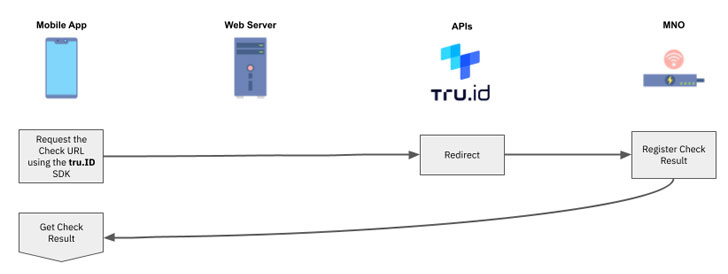
6 — The MNO will receive the web request via a
redirect from the tru.ID platform. The MNO then determines if the
phone number associated with the authenticated mobile data session
matches the phone number associated with the requested Check URL.
If it does, then the phone number has been successfully
verified.
7 — At this point the tru.ID platform also
performs a SIM card change lookup and stores the result.
8 — Once the Check URL request has completed
and the SIM change information retrieved, the mobile application
can request the result of the phone verification from the tru.ID
API.
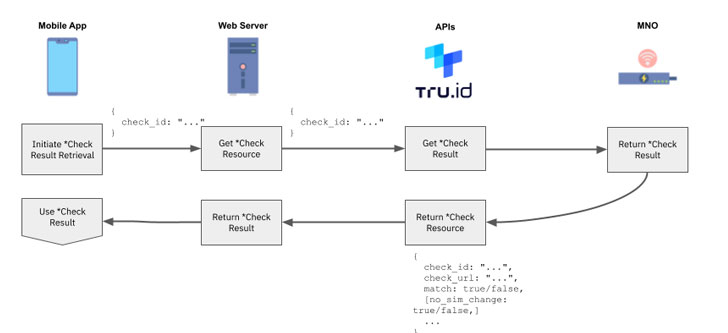
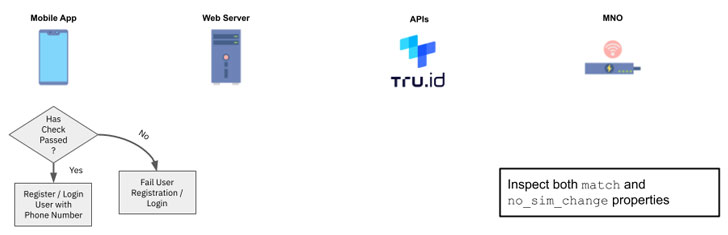
9 — Use the phone verification match and SIM
card change `no_sim_change` properties within your application
logic.
How to Get Started
Of course, seeing is believing. You can start testing now for
free and make your first API call within minutes – just sign up[5] with tru.ID and check
the documentation[6]
for your guide to getting started.
References
- ^
SIM swap
fraud (tru.id) - ^
SIM-based authentication is an identity
breakthrough (tru.id) - ^
SIM-based authentication
(tru.id) - ^
SubscriberCheck from tru.ID
(tru.id) - ^
sign up
(tru.id) - ^
documentation
(developer.tru.id)
Read more http://feedproxy.google.com/~r/TheHackersNews/~3/wTmx1fRCu8M/new-api-lets-app-developers.html